Hosting a Hugo Website on AWS Made Easy with Terraform: S3, CloudFront, Route53, and SSL Automation
In this post I will show you how to deploy a Hugo site to AWS using Terraform.
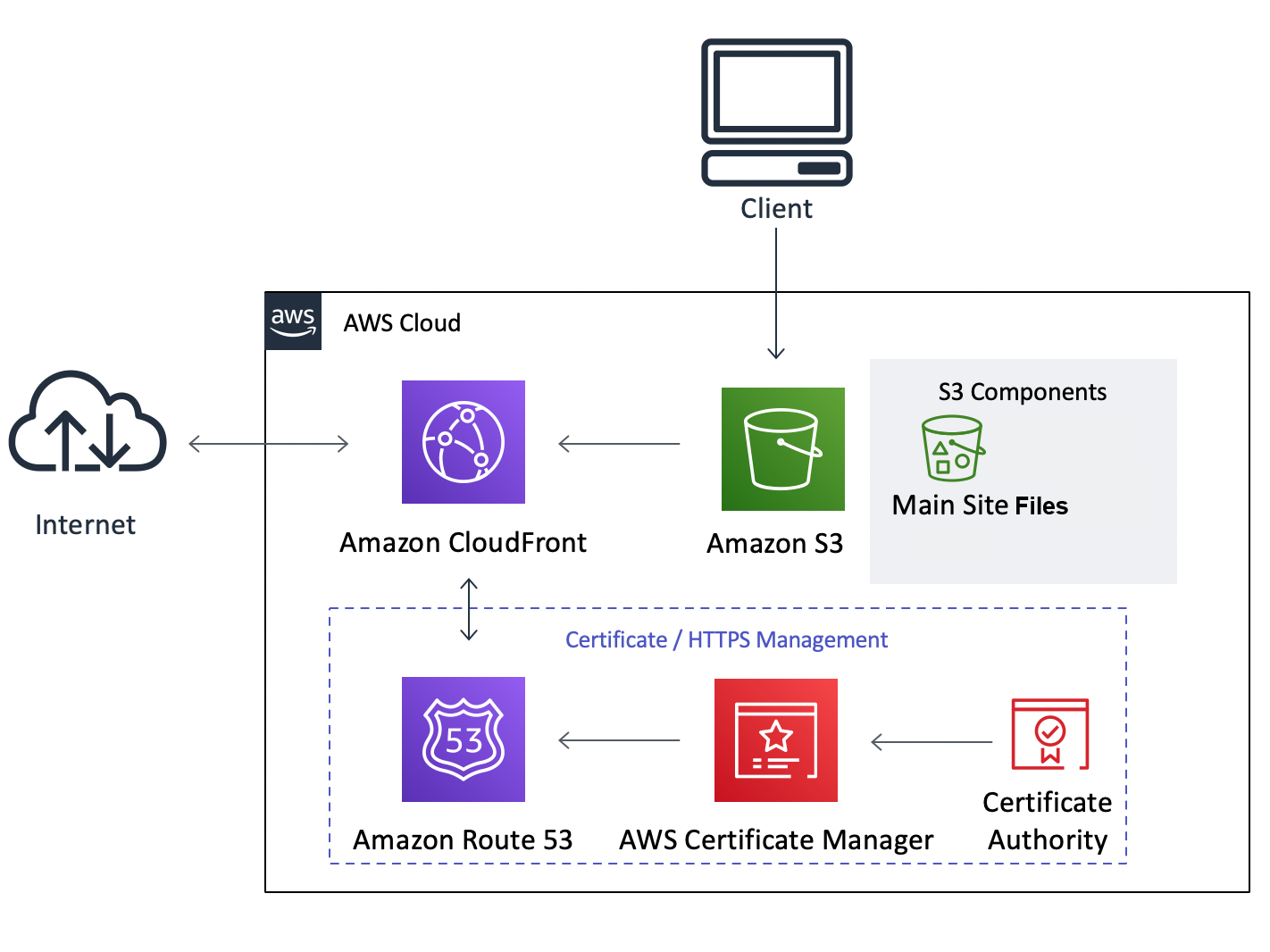
The idea is not only to store the Hugo site static files in an S3 bucket and serve it using CloudFront, but also to automate the process of creating any needed DNS records with Route53 and the corresponding certificates with AWS Certificate Manager.
The architecture of the site is shown below:
For simplicity, I will ignore terraform best practices, and create a single main.tf file in the root directory of your Hugo project with all the content.
Lets go trough the different sections of the file:
First, we define the AWS provider:
# main.tf

provider "aws" {
  region = "us-east-1"
}
Next, we define the variables that will be used in the rest of the file:
# Variables
variable "root_domain_name" {
  type    = string
  default = "eduardofernandez.info"
}

variable "website_domain_name" {
  type    = string
  default = "www.eduardofernandez.info"
}

variable "website_root_file" {
  type    = string
  default = "index.html"
}

variable "website_error_file" {
  type    = string
  default = "404.html"
}
Then, we create the DNS website_record (for our case www.eduardofernandez.info) and make sure is pointed to the CloudFront distribution.
Remember that Terraform will figure the order based on the resource dependency graph and will create the DNS record only after the CloudFront distribution is created.
# Route53 hosted zone for the root domain

data "aws_route53_zone" "main_hosted_zone" {
  name         = var.root_domain_name
  private_zone = false
}

resource "aws_route53_record" "website_record" {
  zone_id = data.aws_route53_zone.main_hosted_zone.zone_id
  name    = var.website_domain_name
  type    = "A"
  alias {
    name                   = aws_cloudfront_distribution.personal_website_distribution.domain_name
    zone_id                = aws_cloudfront_distribution.personal_website_distribution.hosted_zone_id
    evaluate_target_health = false
  }
}

resource "aws_route53_record" "cert_dns" {
  for_each = {
    for record in aws_acm_certificate.certificate.domain_validation_options : record.domain_name => {
      name    = record.resource_record_name
      record  = record.resource_record_value
      type    = record.resource_record_type
    }
  }
  zone_id         = data.aws_route53_zone.main_hosted_zone.zone_id
  type            = each.value.type
  name            = each.value.name
  records         = [each.value.record]
  ttl             = 60
  allow_overwrite = true
}
Next, we create the ACM certificate and the validation record.
The validation record is needed to prove that you own the domain name.
The certificate will be used by the CloudFront distribution to serve the site over HTTPS.
Using DNS validation is the recommended method as validating using EMAIL requires manual intervention, which is not ideal for automation.
# ACM Certificate

resource "aws_acm_certificate" "certificate" {
  domain_name               = var.website_domain_name
  subject_alternative_names = ["*.${var.root_domain_name}", var.website_domain_name]
  validation_method         = "DNS"

  lifecycle {
    create_before_destroy = true
  }

  tags = {
    Name = "${var.website_domain_name} Certificate"
  }
}

resource "aws_acm_certificate_validation" "certificate_validation" {
  certificate_arn         = aws_acm_certificate.certificate.arn
  validation_record_fqdns = [for record in aws_route53_record.cert_dns : record.fqdn]
}
Now, we create the S3 bucket, set the ACL policies, set the IAM policy required for any internet user to be able to access files from the bucket, and finally, upload the files from the Hugo site public directory to the bucket.
When uploading the files, we set the content type based on the file extension and terraform will compute the MD5 hash of the file to determine whether some files have changed and need to be uploaded again.
# S3 Bucket

resource "aws_s3_bucket" "personal_website_bucket" {
  # if blank, bucket will be ignored so a random id is generated
  # EX: terraform-20240829064801797700000001
  bucket = var.website_domain_name
}

resource "aws_s3_bucket_website_configuration" "personal_website_bucket_website" {
  bucket = aws_s3_bucket.personal_website_bucket.id

  index_document {
    suffix = var.website_root_file
  }
  error_document {
    key = var.website_error_file
  }
}

resource "aws_s3_bucket_versioning" "bucket_versioning" {
  bucket = aws_s3_bucket.personal_website_bucket.id
  versioning_configuration {
    status = "Disabled"
  }
}

resource "aws_s3_bucket_ownership_controls" "example" {
  bucket = aws_s3_bucket.personal_website_bucket.id
  rule {
    object_ownership = "BucketOwnerPreferred"
  }
}

resource "aws_s3_bucket_public_access_block" "example" {
  bucket = aws_s3_bucket.personal_website_bucket.id

  block_public_acls       = false
  block_public_policy     = false
  ignore_public_acls      = false
  restrict_public_buckets = false
}

resource "aws_s3_bucket_policy" "allow_access_from_internet" {
  bucket     = aws_s3_bucket.personal_website_bucket.id
  policy     = data.aws_iam_policy_document.allow_access_from_internet.json
  depends_on = [data.aws_iam_policy_document.allow_access_from_internet]
}

resource "aws_s3_object" "personal_website_files" {
  bucket   = aws_s3_bucket.personal_website_bucket.bucket
  for_each = fileset("${path.module}/public", "**")
  key      = each.value
  source   = "${path.module}/public/${each.value}"
  etag     = filemd5("${path.module}/public/${each.value}")
  content_type = lookup({
    "html" = "text/html",
    "css"  = "text/css",
    "js"   = "application/javascript",
    "png"  = "image/png",
    "jpg"  = "image/jpeg",
    "jpeg" = "image/jpeg",
    "gif"  = "image/gif",
    "svg"  = "image/svg+xml",
    "ico"  = "image/x-icon",
    "pdf"  = "application/pdf"
  }, split(".", each.value)[length(split(".", each.value)) - 1], "application/octet-stream")
}
This is the IAM policy that allows any internet user to access the files in the S3 bucket.
# IAM - S3 Bucket Policy

data "aws_iam_policy_document" "allow_access_from_internet" {
  version = "2012-10-17"
  statement {
    sid    = "Stmt1724907217157"
    effect = "Allow"
    principals {
      type        = "*"
      identifiers = ["*"]
    }
    actions   = ["s3:GetObject"]
    resources = ["${aws_s3_bucket.personal_website_bucket.arn}/*"]
  }
}
Finally, we create the CloudFront distribution that will serve the site over HTTPS.
We set the price class to PriceClass_100 to avoid expending too much money, you may want to change this to PriceClass_All if you want to use all the edge locations or to any other value that fits your needs.
Enable IPv6, set the default root object to index.html, and set the custom error response to 404.html.
We set the origin to the S3 bucket, the custom origin config to use HTTP only.
The last part uses the certificate created before by ACM, sets the SSL support method to sni-only, and the minimum protocol version to TLSv1.2_2021.
# CloudFront Distribution

resource "aws_cloudfront_distribution" "personal_website_distribution" {

  price_class = "PriceClass_100"

  enabled             = true
  is_ipv6_enabled     = true
  default_root_object = var.website_root_file

  origin {
    domain_name              = aws_s3_bucket.personal_website_bucket.website_endpoint
    origin_id                = var.website_domain_name

    custom_origin_config {
        http_port              = 80
        https_port             = 443
        origin_protocol_policy = "http-only"
        origin_ssl_protocols   = ["TLSv1.2"]
    }
  }

  custom_error_response {
    error_code            = 404
    response_code         = 200
    response_page_path    = "/${var.website_error_file}"
  }

  aliases = [ var.website_domain_name ]

  restrictions {
    geo_restriction {
      restriction_type = "none"
      locations = []
    }
  }

  default_cache_behavior {
    allowed_methods  = ["GET", "HEAD", "OPTIONS"]
    cached_methods   = ["GET", "HEAD", "OPTIONS"]
    target_origin_id = aws_s3_bucket.personal_website_bucket.bucket

    forwarded_values {
      query_string = false

      cookies {
        forward = "none"
      }
    }

    viewer_protocol_policy = "redirect-to-https"
    min_ttl                = 0
    default_ttl            = 3600
    max_ttl                = 86400
  }

  viewer_certificate {
    acm_certificate_arn = aws_acm_certificate.certificate.arn
    ssl_support_method  = "sni-only"
    minimum_protocol_version = "TLSv1.2_2021"
  }

  tags = {
    Name = "${var.website_domain_name} Distribution"
  }

  depends_on = [
    aws_s3_bucket.personal_website_bucket,
    aws_s3_object.personal_website_files
  ]
}
The last part of the file is the output section, where we define the outputs that will be shown after the Terraform apply command is executed. Add any other output that you may need for your use case.
output "website_endpoint" {
  value = "http://${aws_s3_bucket.personal_website_bucket.website_endpoint}"
}

output "website_domain_name" {
  value = "http://${aws_s3_bucket.personal_website_bucket.bucket_domain_name}"
}

output "cloudfront_domain_name" {
  value = "https://${aws_cloudfront_distribution.personal_website_distribution.domain_name}"
}

output "personal_website_url" {
  value = "https://${var.website_domain_name}"
}
The full content of the file is shown below:
# main.tf

provider "aws" {
  region = "us-east-1"
}

# Variables

variable "root_domain_name" {
  type    = string
  default = "eduardofernandez.info"
}

variable "website_domain_name" {
  type    = string
  default = "www.eduardofernandez.info"
}

variable "website_root_file" {
  type    = string
  default = "index.html"
}

variable "website_error_file" {
  type    = string
  default = "404.html"
}

# Route53 hosted zone for the root domain

data "aws_route53_zone" "main_hosted_zone" {
  name         = var.root_domain_name
  private_zone = false
}

resource "aws_route53_record" "website_record" {
  zone_id = data.aws_route53_zone.main_hosted_zone.zone_id
  name    = var.website_domain_name
  type    = "A"
  alias {
    name                   = aws_cloudfront_distribution.personal_website_distribution.domain_name
    zone_id                = aws_cloudfront_distribution.personal_website_distribution.hosted_zone_id
    evaluate_target_health = false
  }
}

resource "aws_route53_record" "cert_dns" {
  for_each = {
    for record in aws_acm_certificate.certificate.domain_validation_options : record.domain_name => {
      name    = record.resource_record_name
      record  = record.resource_record_value
      type    = record.resource_record_type
    }
  }
  zone_id         = data.aws_route53_zone.main_hosted_zone.zone_id
  type            = each.value.type
  name            = each.value.name
  records         = [each.value.record]
  ttl             = 60
  allow_overwrite = true
}

# ACM Certificate

resource "aws_acm_certificate" "certificate" {
  domain_name               = var.website_domain_name
  subject_alternative_names = ["*.${var.root_domain_name}", var.website_domain_name]
  validation_method         = "DNS"

  lifecycle {
    create_before_destroy = true
  }

  tags = {
    Name = "${var.website_domain_name} Certificate"
  }
}

resource "aws_acm_certificate_validation" "certificate_validation" {
  certificate_arn         = aws_acm_certificate.certificate.arn
  validation_record_fqdns = [for record in aws_route53_record.cert_dns : record.fqdn]
}

# S3 Bucket

resource "aws_s3_bucket" "personal_website_bucket" {
  # if blank, bucket will be ignored so a random id is generated
  # EX: terraform-20240829064801797700000001
  bucket = var.website_domain_name
}

resource "aws_s3_bucket_website_configuration" "personal_website_bucket_website" {
  bucket = aws_s3_bucket.personal_website_bucket.id

  index_document {
    suffix = var.website_root_file
  }
  error_document {
    key = var.website_error_file
  }
}

resource "aws_s3_bucket_versioning" "bucket_versioning" {
  bucket = aws_s3_bucket.personal_website_bucket.id
  versioning_configuration {
    status = "Disabled"
  }
}

resource "aws_s3_bucket_ownership_controls" "example" {
  bucket = aws_s3_bucket.personal_website_bucket.id
  rule {
    object_ownership = "BucketOwnerPreferred"
  }
}

resource "aws_s3_bucket_public_access_block" "example" {
  bucket = aws_s3_bucket.personal_website_bucket.id

  block_public_acls       = false
  block_public_policy     = false
  ignore_public_acls      = false
  restrict_public_buckets = false
}

resource "aws_s3_bucket_policy" "allow_access_from_internet" {
  bucket     = aws_s3_bucket.personal_website_bucket.id
  policy     = data.aws_iam_policy_document.allow_access_from_internet.json
  depends_on = [data.aws_iam_policy_document.allow_access_from_internet]
}

resource "aws_s3_object" "personal_website_files" {
  bucket   = aws_s3_bucket.personal_website_bucket.bucket
  for_each = fileset("${path.module}/public", "**")
  key      = each.value
  source   = "${path.module}/public/${each.value}"
  etag     = filemd5("${path.module}/public/${each.value}")
  content_type = lookup({
    "html" = "text/html",
    "css"  = "text/css",
    "js"   = "application/javascript",
    "png"  = "image/png",
    "jpg"  = "image/jpeg",
    "jpeg" = "image/jpeg",
    "gif"  = "image/gif",
    "svg"  = "image/svg+xml",
    "ico"  = "image/x-icon",
    "pdf"  = "application/pdf"
  }, split(".", each.value)[length(split(".", each.value)) - 1], "application/octet-stream")
}

# IAM - S3 Bucket Policy

data "aws_iam_policy_document" "allow_access_from_internet" {
  version = "2012-10-17"
  statement {
    sid    = "Stmt1724907217157"
    effect = "Allow"
    principals {
      type        = "*"
      identifiers = ["*"]
    }
    actions   = ["s3:GetObject"]
    resources = ["${aws_s3_bucket.personal_website_bucket.arn}/*"]
  }
}

# CloudFront Distribution

resource "aws_cloudfront_distribution" "personal_website_distribution" {

  # don't break the bank with the default price class :)
  price_class = "PriceClass_100"

  enabled             = true
  is_ipv6_enabled     = true
  default_root_object = var.website_root_file

  origin {
    domain_name              = aws_s3_bucket.personal_website_bucket.website_endpoint
    origin_id                = var.website_domain_name

    custom_origin_config {
        http_port              = 80
        https_port             = 443
        origin_protocol_policy = "http-only"
        origin_ssl_protocols   = ["TLSv1.2"]
    }
  }

  custom_error_response {
    error_code            = 404
    response_code         = 200
    response_page_path    = "/${var.website_error_file}"
  }

  aliases = [ var.website_domain_name ]

  restrictions {
    geo_restriction {
      restriction_type = "none"
      locations = []
    }
  }

  default_cache_behavior {
    allowed_methods  = ["GET", "HEAD", "OPTIONS"]
    cached_methods   = ["GET", "HEAD", "OPTIONS"]
    target_origin_id = aws_s3_bucket.personal_website_bucket.bucket

    forwarded_values {
      query_string = false

      cookies {
        forward = "none"
      }
    }

    viewer_protocol_policy = "redirect-to-https"
    min_ttl                = 0
    default_ttl            = 3600
    max_ttl                = 86400
  }

  viewer_certificate {
    acm_certificate_arn = aws_acm_certificate.certificate.arn
    ssl_support_method  = "sni-only"
    minimum_protocol_version = "TLSv1.2_2021"
  }

  tags = {
    Name = "${var.website_domain_name} Distribution"
  }

  depends_on = [
    aws_s3_bucket.personal_website_bucket,
    aws_s3_object.personal_website_files
  ]
}

output "website_endpoint" {
  value = "http://${aws_s3_bucket.personal_website_bucket.website_endpoint}"
}

output "website_domain_name" {
  value = "http://${aws_s3_bucket.personal_website_bucket.bucket_domain_name}"
}

output "cloudfront_domain_name" {
  value = "https://${aws_cloudfront_distribution.personal_website_distribution.domain_name}"
}

output "personal_website_url" {
  value = "https://${var.website_domain_name}"
}
To deploy the site, you need to have Terraform installed and configured with your AWS credentials.
After that, you can run the following commands:
terraform init
terraform apply
After the apply command is executed, you will see the outputs with the URLs of the site and the CloudFront distribution.
If you see any errors during the apply command, just retry the apply command until it finishes successfully.
terraform apply
The output will look like this:
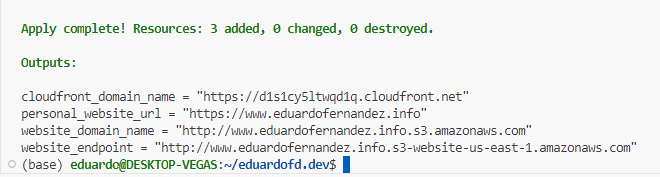
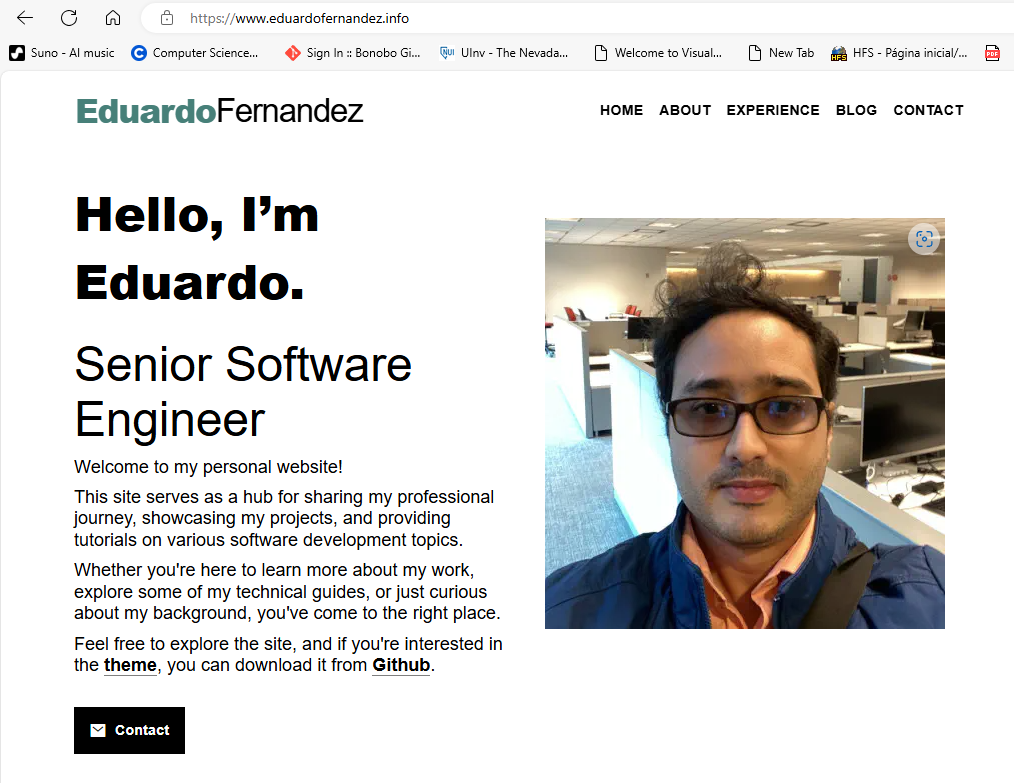
You can now access your site using the cloudfront_domain_name=https://d1s1cy5ltwqd1q.cloudfront.net or the new Route53 DNS record personal_website_url=https://www.eduardofernandez.info
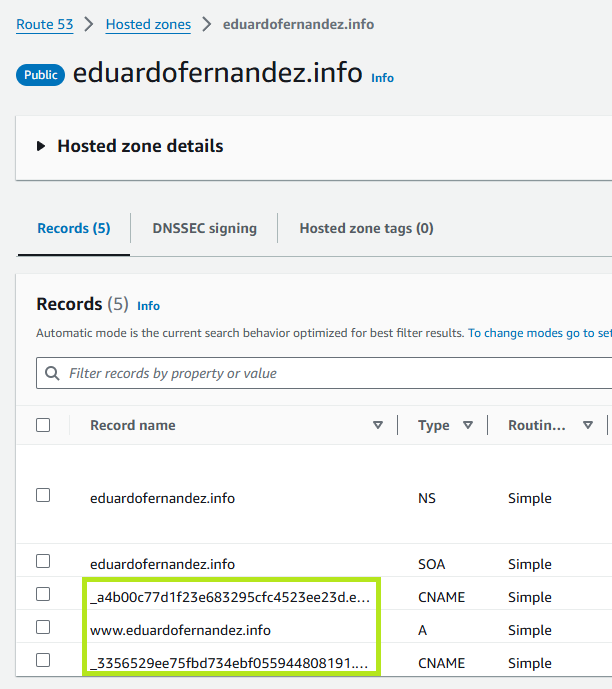
Go to your AWS console and check the resources created by Terraform.
In Route53, you will see the 3 new records created for the site.
In ACM, you will see the new certificate created for the site.
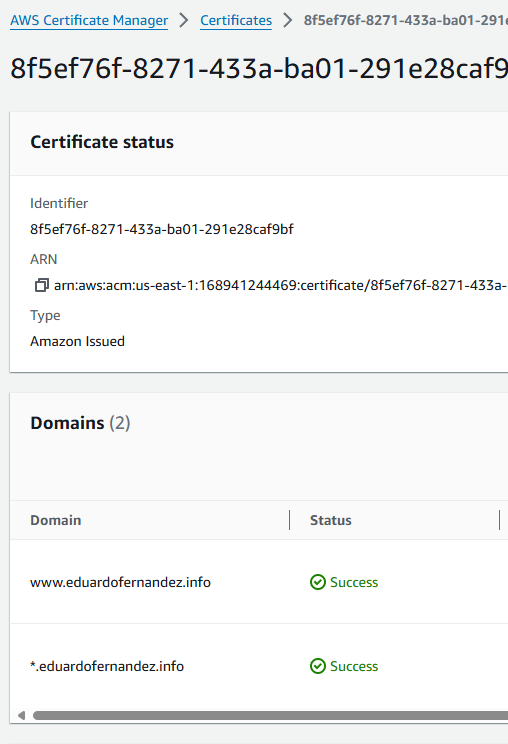
In S3, you will see the new bucket created for the site.
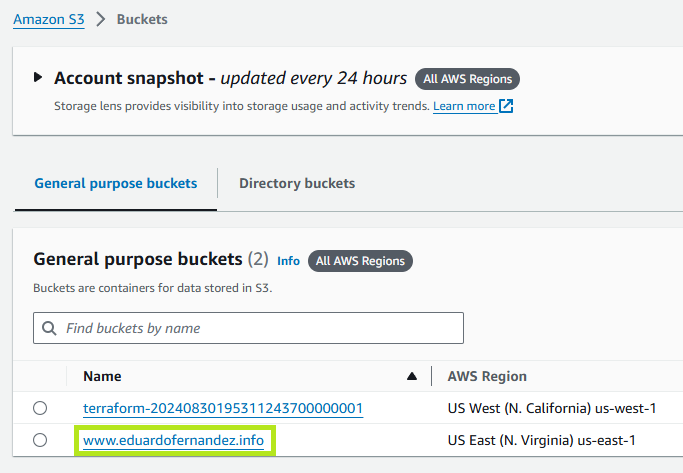
In CloudFront, you will see the new distribution created for the site.

That’s it! You have successfully deployed a Hugo site to AWS using Terraform.