Serverless Image Upload and Object Detection on AWS Using Lambda, Rekognition, DynamoDB, and Terraform
Introduction
This post will show you how to build a serverless image upload and object detection application on AWS using Lambda, Rekognition, DynamoDB, and Terraform.
The architecture of the application is shown below:
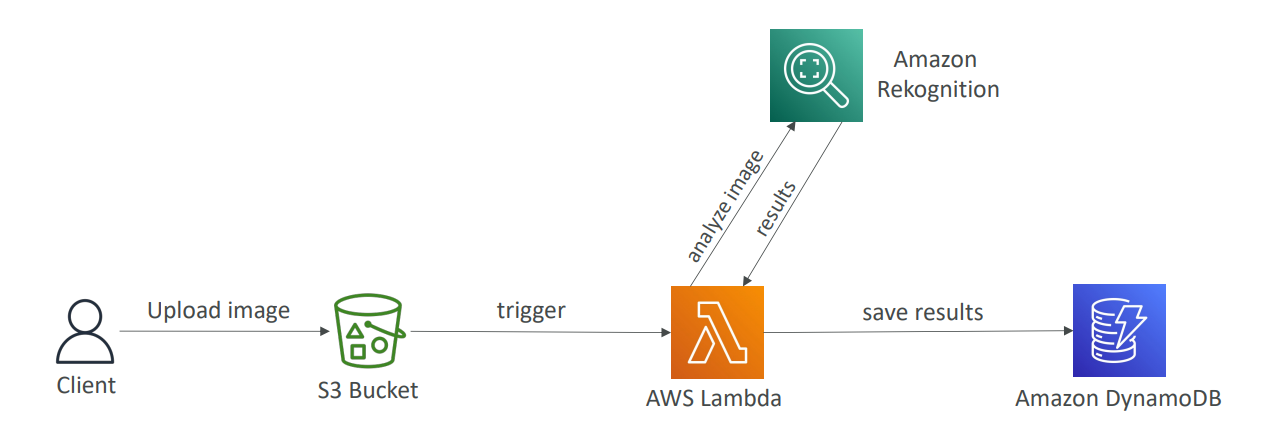
The application allows users to upload images to an S3 bucket. When an image is uploaded, an S3 bucket notification triggers a Lambda function that reads the image from the S3 bucket, sends it to the Rekognition service for object detection, and stores the results in a DynamoDB table.
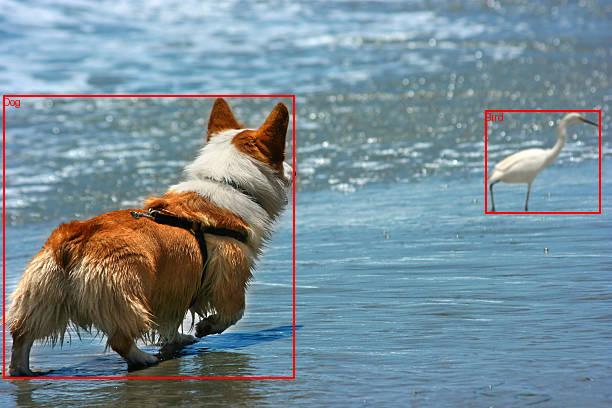
The Lambda function draws bounding boxes and labels on a copy of the image and saves the image back to the S3 bucket with the postfix _labeled.

Prerequisites
- Terraform installed on your local machine.
- An AWS account with access keys configured.
Step 1: Create the Terraform Configuration File
For simplicity, I will ignore terraform best practices, and create a single main.tf file in the root directory of your Hugo project with all the content.
Lets go trough the different sections of the file:
Provider
The provider block configures the AWS provider. In this case, we are using the us-west-2 region.
provider "aws" {
  region = "us-west-2"
}
S3
The S3 bucket resource creates an S3 bucket to store the images uploaded by the user. The force_destroy attribute is set to true to allow the bucket to be destroyed even if it contains objects when terraform destroys the infrastructure.
Next, the S3 bucket policy resource creates a policy that allows the Lambda function to access the S3 bucket. The policy grants the Lambda function permission to GetObject and PutObject actions on the bucket. This will be needed to read and write images to the bucket.
The S3 bucket notification resource creates an event source mapping that triggers the Lambda function when an object is created in the S3 bucket. The depends_on attribute is set to the aws_lambda_permission resource to ensure terraform creates the permission before the event notification.
The Lambda permission resource creates a permission that allows the S3 bucket to invoke the Lambda function. The source_arn attribute is set to the S3 bucket ARN to specify the source of the event.
# S3 Bucket
resource "aws_s3_bucket" "image_bucket" {
  bucket = "rekn-imagebucket"
  force_destroy = true
}

# S3 Bucket Policy to allow Lambda access
resource "aws_s3_bucket_policy" "bucket_policy" {
  bucket = aws_s3_bucket.image_bucket.id
  policy = jsonencode({
    Version = "2012-10-17"
    Statement = [
      {
        Effect = "Allow"
        Principal = {
          AWS = aws_iam_role.lambda_role.arn
        }
        Action = [
          "s3:GetObject",
          "s3:PutObject"
        ]
        Resource = "${aws_s3_bucket.image_bucket.arn}/*"
      }
    ]
  })
}

# S3 Event Source for Lambda
resource "aws_s3_bucket_notification" "bucket_notification" {
  bucket = aws_s3_bucket.image_bucket.id

  lambda_function {
    lambda_function_arn = aws_lambda_function.rekn_function.arn
    events              = ["s3:ObjectCreated:*"]
    # filter_suffix       = "_labeled.jpg"
  }

  depends_on = [aws_lambda_permission.allow_s3]
}

resource "aws_lambda_permission" "allow_s3" {
  statement_id  = "AllowS3Invoke"
  action        = "lambda:InvokeFunction"
  function_name = aws_lambda_function.rekn_function.function_name
  principal     = "s3.amazonaws.com"
  source_arn    = aws_s3_bucket.image_bucket.arn
}
IAM
The IAM role resource creates an IAM role that allows the Lambda function to assume the role. The assume_role_policy attribute specifies the trust relationship policy that allows the Lambda service to assume the role, this is needed for the Lambda function to execute.
# IAM Role
resource "aws_iam_role" "lambda_role" {
  name = "rekn-lambdarole"
  assume_role_policy = jsonencode({
    Version = "2012-10-17"
    Statement = [
      {
        Effect = "Allow"
        Principal = {
          Service = "lambda.amazonaws.com"
        }
        Action = "sts:AssumeRole"
      }
    ]
  })
}
Then we create a policy to allow the Lambda function to perform actions on Rekognition, create log groups, create log streams, and put log events in CloudWatch Logs.
# IAM Policy
resource "aws_iam_role_policy" "lambda_policy" {
  name = "rekn-lambdapolicy"
  role = aws_iam_role.lambda_role.id
  policy = jsonencode({
    Version = "2012-10-17"
    Statement = [
      {
        Effect = "Allow"
        Action = [
          "rekognition:*",
          "logs:CreateLogGroup",
          "logs:CreateLogStream",
          "logs:PutLogEvents"
        ]
        Resource = ["*"]
      }
    ]
  })
}
Lambda
Next, we create the lambda function that will be triggered by the S3 bucket notification. The function reads the image from the S3 bucket, sends it to the Rekognition service for object detection, and stores the results in a DynamoDB table.
# Lambda Function
resource "aws_lambda_function" "rekn_function" {
  function_name = "rekn-function"
  filename      = "../lambda/index.zip"  # Path to the ZIP file containing your Lambda function code
  handler       = "index.handler"
  runtime       = "python3.10"
  role          = aws_iam_role.lambda_role.arn
  environment {
    variables = {
      TABLE  = aws_dynamodb_table.image_table.name
      BUCKET = aws_s3_bucket.image_bucket.bucket
    }
  }
  layers = [aws_lambda_layer_version.pillow_layer.arn]
  source_code_hash = filebase64sha256("../lambda/index.zip")
}
index.zip contains the Lambda function code and the Pillow library. The Pillow library is used to draw bounding boxes and labels on the image.
The Lambda layer zipped in ../lambda/PillowLayer.zip creates a Lambda layer that contains the Pillow library. The layer is used by the Lambda function to draw bounding boxes and labels on the image.
For a tutorial on how to create a Python Lambda layer with Pillow, see Creating a Python Lambda Layer with Pillow.
# Lambda Layer
resource "aws_lambda_layer_version" "pillow_layer" {
  filename         = "../lambda/PillowLayer.zip"
  layer_name       = "PillowLayer"
  compatible_runtimes = ["python3.10"]
  description      = "A layer for Pillow (Python Imaging Library)"
}
To avoid any errors you may want to place the lambda and layer files following the structure below in the snippet below or place it next to the main.tf file and change the paths in the resources aws_lambda_function, aws_lambda_layer_version.
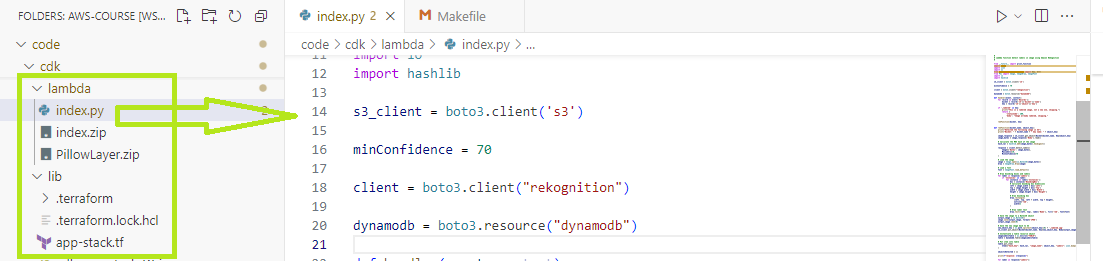
The Lambda function code is shown below, please notice how the handler checks if the image is already labeled and skips the process if it is.
Omitting this check will result in an infinite loop of labeling the same image because the same S3 bucket is used for the labeled images, which will trigger the Lambda function again
The rest of the function code has inline comments to explain the different parts of the code.
#
# Lambda function detect labels in image using Amazon Rekognition
#

from __future__ import print_function
import boto3
import json
import os
from boto3.dynamodb.conditions import Key, Attr
from PIL import Image, ImageDraw, ImageFont
import io
import hashlib

s3_client = boto3.client('s3')

minConfidence = 70

client = boto3.client("rekognition")

dynamodb = boto3.resource("dynamodb")

def handler(event, context):
    for record in event['Records']:
        bucket = record['s3']['bucket']['name']
        key = record['s3']['object']['key']

    if '_labeled' in key:
        print("This is a labeled image, not a new one, skipping.")
        return {
            'statusCode': 200,
            'body': "Image already labeled, skipping."
        }

    rekFunction(bucket, key)


def rekFunction(bucket_name, object_key):
    print("Detected the following image in S3")
    print("Bucket: " + bucket_name + " key name: " + object_key)

    image_response = s3_client.get_object(Bucket=bucket_name, Key=object_key)
    image_bytes = image_response['Body'].read()

    # Calculate the MD5 hash of the image
    hash_val = hashlib.md5(image_bytes).hexdigest()

    response = client.detect_labels(
        Image={'Bytes': image_bytes},
        MaxLabels=10,
        MinConfidence=70
    )

    # Load the image
    image = Image.open(io.BytesIO(image_bytes))
    draw = ImageDraw.Draw(image)

    # Load a font
    font = ImageFont.load_default()

    # Draw bounding boxes and labels
    for label in response['Labels']:
        if 'Instances' in label:
            for instance in label['Instances']:
                box = instance['BoundingBox']
                # Calculate bounding box dimensions
                left = image.width * box['Left']
                top = image.height * box['Top']
                width = image.width * box['Width']
                height = image.height * box['Height']

                # Draw bounding box
                draw.rectangle(
                    [left, top, left + width, top + height],
                    outline='red',
                    width=2
                )

                # Draw label text
                draw.text((left, top), label['Name'], fill='red', font=font)

    # Save the image to a BytesIO object
    output_image = io.BytesIO()
    image.save(output_image, format='JPEG')
    output_image.seek(0)

    # Save the new image back to S3
    new_object_key = os.path.splitext(object_key)[0] + '_labeled.jpg'
    s3_client.put_object(Bucket=bucket_name, Key=new_object_key, Body=output_image, ContentType='image/jpeg')

    # Instantiate a table resource object
    imageLabelsTable = os.environ["TABLE"]
    table = dynamodb.Table(imageLabelsTable)

    # Put item into table
    table.put_item(
        Item={"hash_key": hash_val, "image_name": object_key, "Labels": json.dumps(response["Labels"], indent=4)}
    )

    objectsDetected = []

    print(f"response: {response}")

    for label in response["Labels"]:
        newItem = label["Name"]
        objectsDetected.append(newItem)
        objectNum = len(objectsDetected)
        itemAtt = f"object{objectNum}"
        response = table.update_item(
            Key={"hash_key": hash_val},
            UpdateExpression=f"set {itemAtt} = :r",
            ExpressionAttributeValues={":r": f"{newItem}"},
            ReturnValues="UPDATED_NEW"
        )
DynamoDB
The DynamoDB table resource creates a DynamoDB table to store the image labels detected by the Lambda function. The table has a hash key attribute named hash_key and a billing mode set to PAY_PER_REQUEST.
The lifecycle block is used to destroy the table when running terraform destroy to delete the infrastructure of the app.
# DynamoDB Table
resource "aws_dynamodb_table" "image_table" {
  name           = "rekn-imagetable"
  hash_key       = "hash_key"
  billing_mode   = "PAY_PER_REQUEST"
  attribute {
    name = "hash_key"
    type = "S"
  }
  lifecycle {
    prevent_destroy = false
  }
}
The below policy attachment allows the Lambda function to access the DynamoDB table.
# DynamoDB Table Policy to allow Lambda access
resource "aws_iam_role_policy_attachment" "dynamodb_policy_attachment" {
  role       = aws_iam_role.lambda_role.name
  policy_arn = "arn:aws:iam::aws:policy/AmazonDynamoDBFullAccess"
}
To deploy the app run the following commands, you need to have Terraform installed and AWS credentials be available on your environment.
terraform init
terraform apply
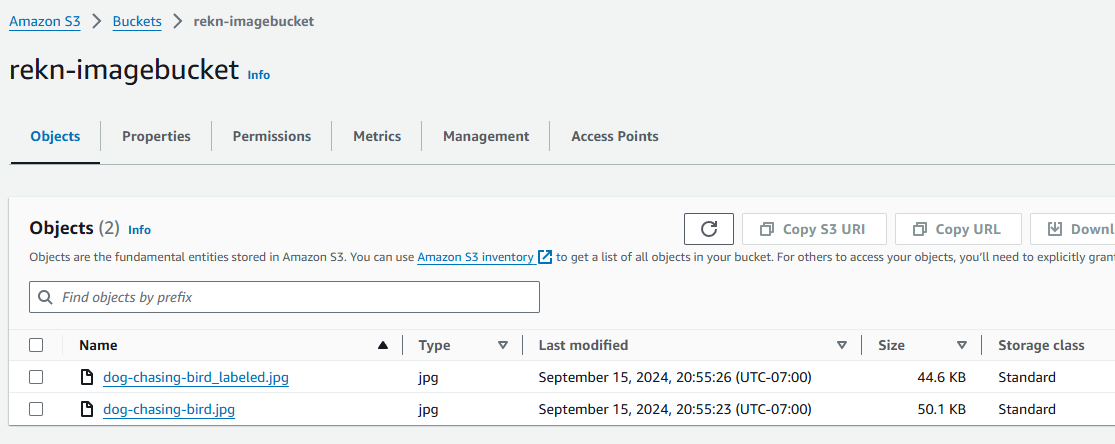
Upload an image to the S3 bucket, it should take only a few miliseconds to process the image and store the labels in the DynamoDB table and check the DynamoDB table.
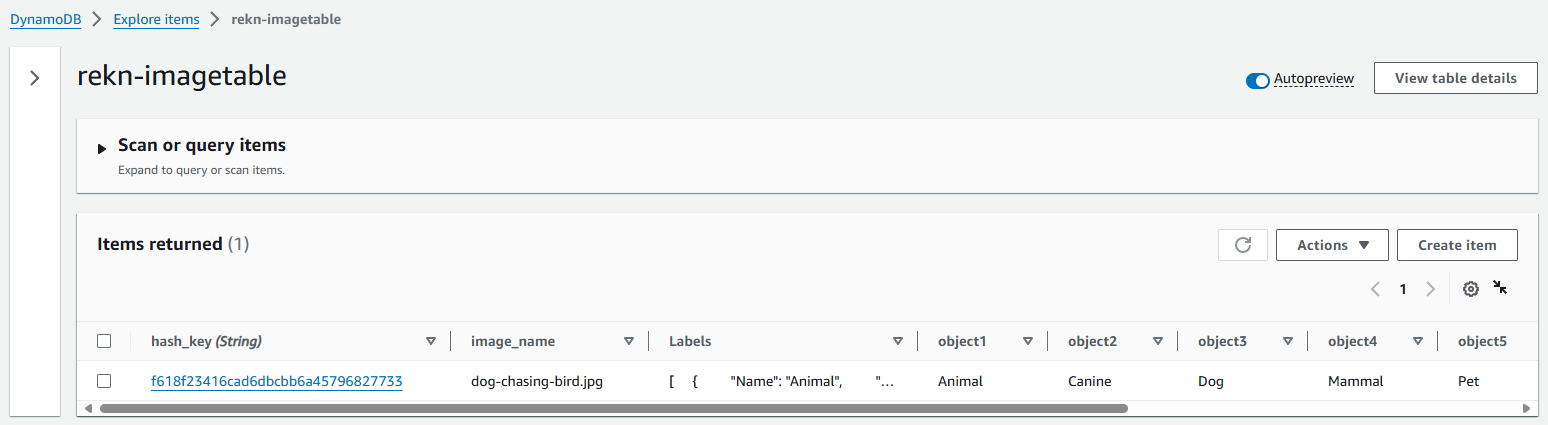
The labeled image should be saved back to the S3 bucket with the postfix _labeled.
Conclusion
In this post, we built a serverless image upload and object detection application on AWS using Lambda, Rekognition, DynamoDB, and Terraform. The application allows users to upload images to an S3 bucket, triggers a Lambda function to read the image from the S3 bucket, sends it to the Rekognition service for object detection, and stores the results in a DynamoDB table.